
CrownPlay Casino Mobile App – Play on Android & iOS
Here is the thing: you do not need a bulky APK or App Store download to play with CrownPlay. You get the full CrownPlay Casino and sportsbook on mobile through your browser, then you can pin a shortcut to your home screen so it behaves like a real app.
Mobile Browser vs App Shortcut
You basically have two ways to play CrownPlay on your phone: straight from the browser or via a home screen shortcut that acts like a lightweight CrownPlay app. Both give you access to casino games, live casino, sports betting, payments, bonuses, and support in just a few taps.
Now, the big plus is that the app-style shortcut gives you an icon and full-screen experience, but you still avoid storage-hungry installs and app store restrictions.
System Requirements and Compatibility
Let’s talk about devices so you know if your phone is ready. CrownPlay runs in modern mobile browsers on Android and iOS, so if Chrome, Safari, or another up-to-date browser works smoothly, you are good to go.
You can play on most recent smartphones and tablets, and the responsive site automatically adapts to your screen size so buttons, betslips, and game lobbies stay comfortable to use.
Mobile access overview
| Item | Requirement / Info |
| Operating systems | Android and iOS smartphones and tablets |
| Access type | Mobile browser, optional home screen shortcut |
| Extra app download | Not required, runs in browser |
| Features on mobile | Casino, live casino, sports, payments, support |
How to Install CrownPlay App on Android
You do not download a traditional Android .apk from us. Instead, you create a progressive web app-style shortcut that opens CrownPlay in a dedicated window and keeps you one tap away from the lobby.
That way, you avoid unknown source installs, but still get a clean icon on your Android home screen that feels like the CrownPlay mobile app.
Using Google Chrome Browser
If you are on Android, we recommend you use Google Chrome for the smoothest experience. Chrome handles our mobile layout, live casino streams, and sports odds really well.
You can still use other modern browsers, but Chrome tends to be the most stable for fast page loading and quick game launches on CrownPlay.
Adding to Home Screen Step-by-Step
Here is how you turn CrownPlay into a tap and play icon on Android using Chrome.
- Open Chrome and go to the official CrownPlay website, then log in or sign up if you are new.
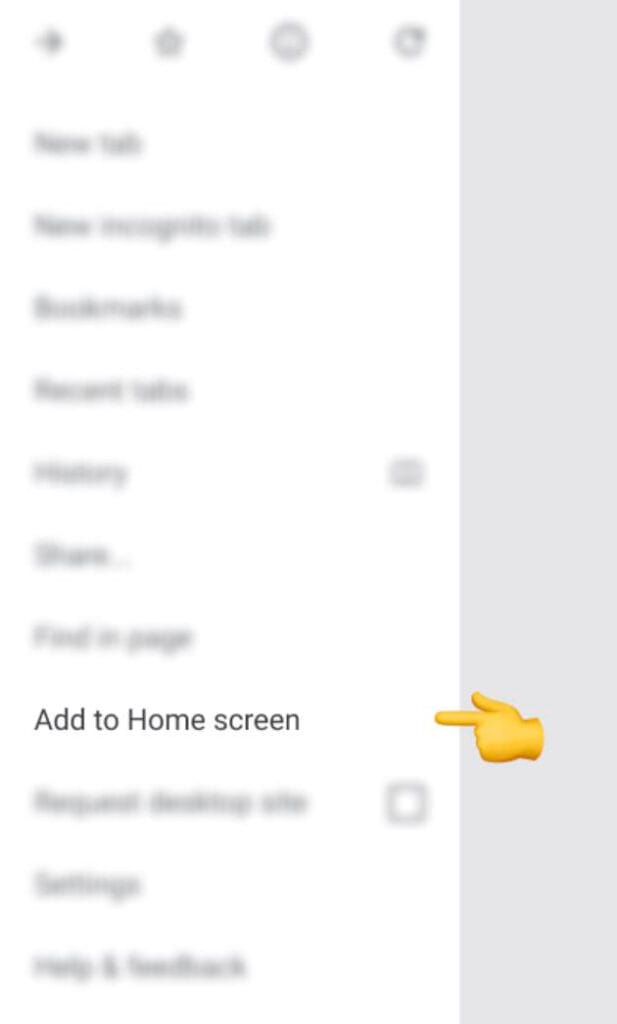
- Tap the three dots menu in the top corner and select “Add to Home screen” or “Install app”, depending on what your browser shows.
- Confirm the name (we suggest “CrownPlay Casino”) and tap Add, then move the icon where you like on your home screen.
- Next time you tap that icon, CrownPlay opens in its own window, just like any Android app, with direct access to games, like Aviator, and bets.
How to Install CrownPlay App on iOS
On iPhone and iPad, the logic is similar, just a little more Apple-style. You use Safari to add CrownPlay to your home screen, and it launches in a standalone window.
You do not go through the App Store, and you do not need to worry about regional app availability, because everything runs in your browser.
Using Safari Browser
Safari is your go-to for iOS because Apple gives full “Add to Home Screen” options there. When you open CrownPlay in Safari, the layout automatically snaps to your iPhone or iPad display.
Once the shortcut is created, you can launch CrownPlay from the icon with full-screen mode and smoother navigation that feels very close to a native casino app.
Adding to Home Screen Options
Here’s how you set CrownPlay up on iOS as a pseudo app.
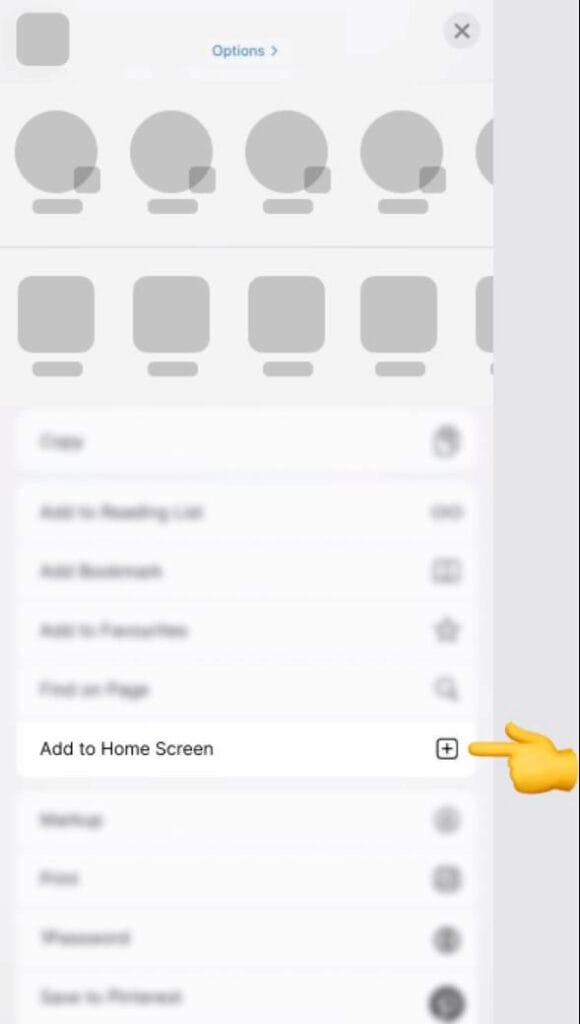
- Open Safari, head to the official CrownPlay site, and log in to your account.
- Tap the Share icon, scroll the options, and pick “Add to Home Screen”.
- Rename the shortcut if you want, tap Add, and the CrownPlay icon appears on your home screen.
- Now, when you tap that icon, CrownPlay opens without the Safari address bar, so you get a cleaner, app-like experience.
Mobile Features and Gaming Experience
Now, let’s dig into what you actually get once you are inside. The CrownPlay mobile site keeps most of the desktop features, including the big library of slots, live tables, and a full sportsbook with pre-match and live markets.
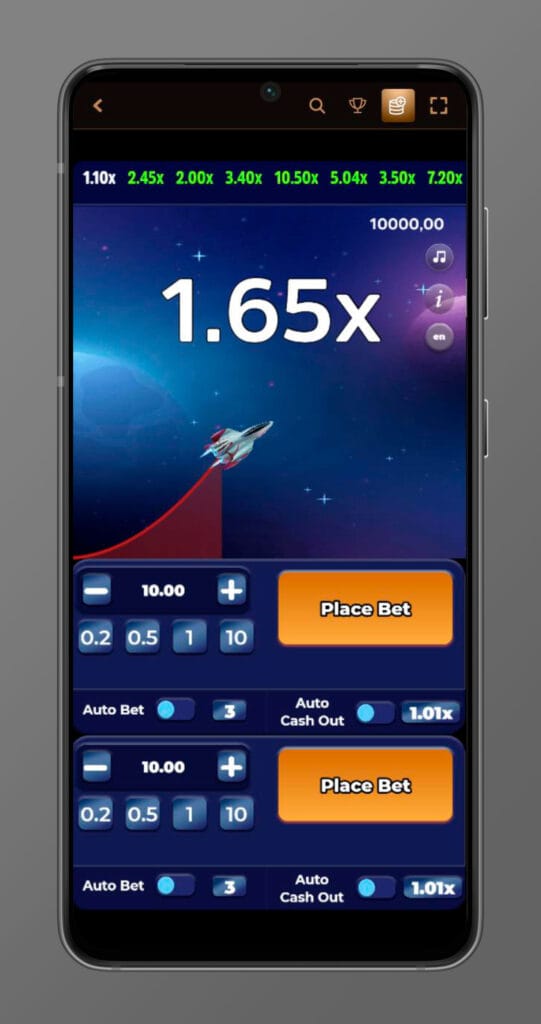
You can also handle payments, claim promotions, check loyalty perks, and adjust responsible gaming tools without leaving your phone.
Mobile Slots and Live Casino
If you love spinning, you will still find thousands of online slots with touch-friendly controls on mobile. Games load with optimized graphics so they stay smooth even on mid-range devices.
Live casino tables stream in HD on mobile, so you can join roulette, blackjack, baccarat, and game shows with real dealers and a layout adapted to portrait or landscape mode.
Mobile casino highlights
| Feature | What you get on mobile |
| Slots | Huge library of video slots and jackpots |
| Live casino | HD streams with real dealers |
| Game layout | Touch controls, clear bet buttons, and menus |
| Performance | Optimised loading and smooth animations |
Sports Betting on Mobile
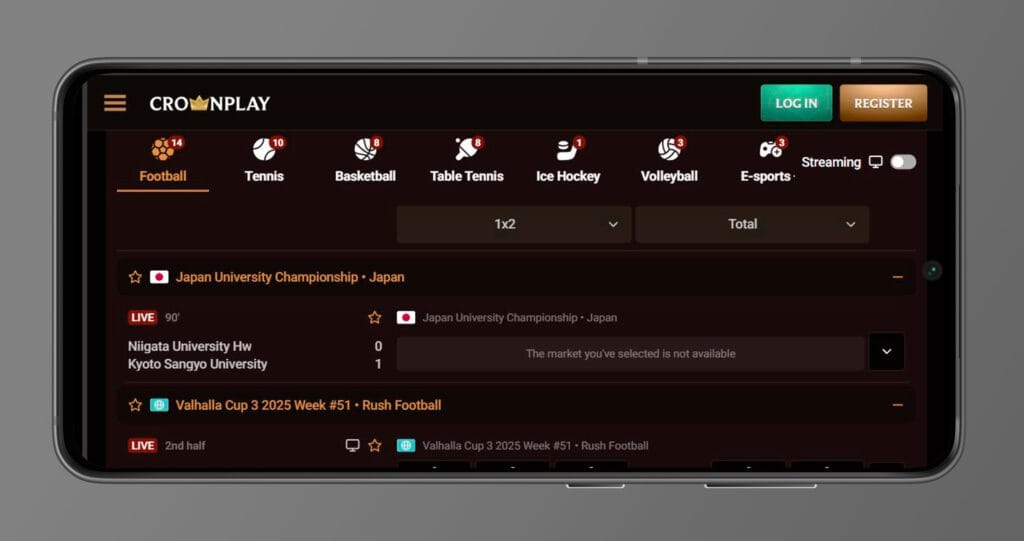
Sports fans, you still get the full CrownPlay sportsbook in your pocket. You can browse leagues, filter markets, build accumulators, and check live scores directly on the small screen.
Mobile live betting lets you react quickly to match events, and boosted odds or special promos work the same way as on desktop.
Mobile Payment Methods
Here’s the thing: doing deposits and withdrawals on mobile should feel as easy as ordering food. CrownPlay supports bank cards, popular e-wallets, and bank transfers on mobile, same like on desktop.
You can set your preferred method, track pending withdrawals, and keep your balance in EUR so you always know exactly what you are betting.
Common mobile payment options
- Visa and Mastercard for quick card deposits and withdrawals in EUR.
- E-wallets like Skrill, Neteller, or PayPal, depending on your region.
- Bank transfers for larger amounts, if you do not mind slower processing times.
- Same account across desktop and mobile, so your balance and limits sync automatically.
Mobile App Navigation and Usability
We know you do not want to dig through endless menus when you just want to spin or place a bet, especially on a smaller screen. The mobile interface keeps the main sections at the bottom or side so you can jump between Casino, Live Casino, Sports, and Jackpots in seconds, with quick access to your account, cashier, and betslip too.
Search filters, game categories, and quick links help you find new titles or go straight back to your favourites on mobile, and recently played games are usually just one tap away, so you can instantly reopen what you were playing last time. The site layout is responsive, which means buttons, game tiles, and menus resize automatically so you are not constantly zooming or mis-tapping on your phone.
Accessing Promotions and Shop
Now, bonuses are a big part of the fun, so you can reach the Promotions section and Shop with just a couple of taps from mobile using the main menu or a dedicated promo link. The layout shows casino and sports offers, reloads, free spin deals, cashback, and any active challenges or tournaments in a scrollable view that is comfortable on small screens, with clear labels and countdowns where relevant.
From the same area, you can see wagering details for active bonuses, check weekly cashback style offers, and explore VIP or Shop items if they are available for your account, including things like Bonus Crab entries, free spins packs, or coin-based rewards. You can also apply promo codes or opt in to specific campaigns from mobile, so you do not miss extras just because you are not on a desktop.
Mobile Customer Support
If something feels off, you do not have to switch to a laptop or wait until you get home. Live chat support is available via the floating icon or the Help Centre link on mobile, and you can also reach email support from the same menu if you prefer to send a longer message.
FAQ and help articles open in a mobile-friendly layout so you can quickly double-check rules about bonuses, payments, or technical issues without endless scrolling. Support generally runs 24/7, so you can get help with verification, withdrawals, technical glitches or promo questions directly from your phone whenever you are playing.
Interface and Design
Our mobile lobby sticks to a clean, dark-themed design with large tiles and readable fonts, so your eyes do not get fried during late sessions and games are easy to recognise at a glance. Navigation follows the same structure as desktop, but stripped of clutter, so it feels familiar yet not overwhelming on a phone and works well in both portrait and landscape modes.
Big plus, the betslip and game controls stay accessible with your thumb, and important buttons like spin, hit, stand or “Place Bet” are sized for touch, so you are less likely to mis-click in the middle of the action. Pages are optimised for quick loading on mobile connections too, so moving between lobbies, games, promos and the cashier feels smooth even when you are not on perfect Wi Fi.
Security on Mobile Devices
Playing on the go should not mean compromising your data, whether you are spinning a slot or cashing out a big sports win. CrownPlay uses modern SSL encryption and secure connections across the mobile site to protect your login details, personal info, and payment data while it travels between your device and our servers.
Payment providers that you use through CrownPlay, like cards and e-wallets, also apply their own security checks and firewalls, so each transaction is double-protected from both our side and the processor side. Account verification steps, anti-fraud monitoring, and AML checks still apply on mobile, so the same standards cover you whether you log in from a laptop, tablet, or a train.
Secure Login and Data Protection
You log in on mobile using your standard credentials, and you can combine that with your phone’s own security, like PIN, fingerprint, or Face ID, to keep your account locked down if someone else picks up your device. The connection uses industry-standard SSL encryption and modern security protocols, so your personal and financial details stay confidential and cannot be read if intercepted.
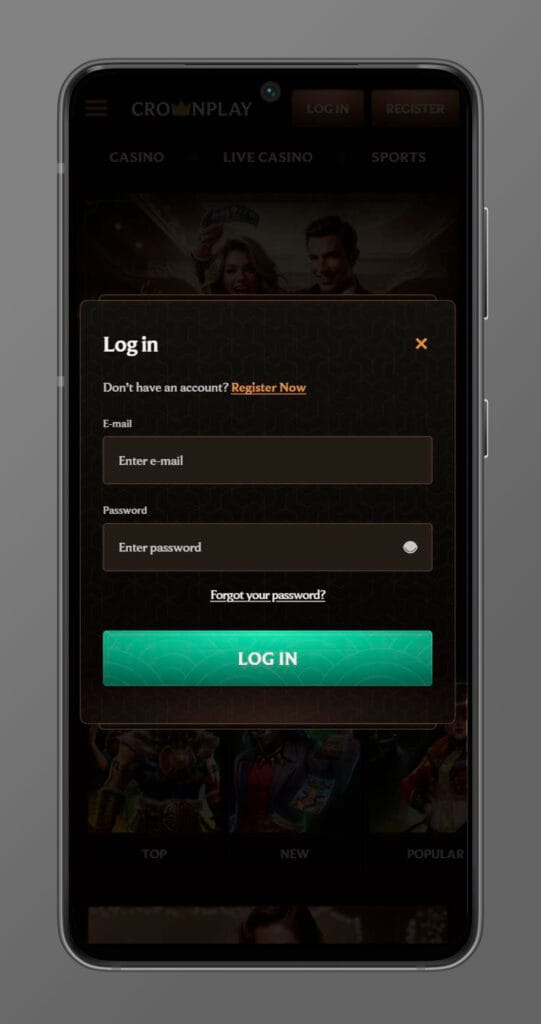
If something looks suspicious, like unusual device locations or login patterns, extra checks can kick in to protect your balance and block unauthorised access. We may also ask for identity and payment verification documents directly from your mobile if needed, and you can upload clear photos of your ID and proof of address through your phone camera to keep the platform safe from abuse and protect legitimate players.
Responsible Gaming on Mobile
Another standout is that responsible gaming tools are also available when you are playing from your phone, so you can stay in control even when you are not at home. You can set daily, weekly, or monthly deposit limits, session reminders, time limits, or full self-exclusion right from the mobile interface, without having to touch a desktop.
There are also links to support organisations for problem gambling and clear messaging about keeping play fun, realistic, and within your budget. From mobile, you can review your recent activity, adjust limits if you need a break, and contact support for extra help, so the “play safe” part travels with you just like the games do.
Conclusion
Bottom line, the CrownPlay Casino “mobile app” experience lives in your browser, but once you pin it to your home screen, it behaves almost like a native Android or iOS app. You keep full access to slots, live casino, sports betting, payments, promotions, and support, just tailored to your mobile screen.
If you want the smoothest setup, use Chrome on Android or Safari on iOS, add CrownPlay to your home screen, then log in and keep your gaming and betting just one tap away wherever you are.

FAQ
Right now, CrownPlay is built as a mobile-optimised website, so you access it in your browser and use “Add to Home Screen” instead of installing a classic store app. That means you skip app store region issues and big downloads, but still get one tap access to casino, live casino, and sports through a shortcut icon on Android or iOS.
You still get casino, live casino, sports, payments, and bonuses, but the interface is trimmed for touch screens, with simplified menus, bigger buttons, and layouts made for one-handed play. Some secondary elements are tucked into drawers or icons so the most important sections, like Games, Sports, and Promotions, stay front and centre on smaller screens.
Yes, deposits and withdrawals on mobile use the same encrypted connection and trusted methods like cards, e-wallets, and bank transfers that you see on desktop. You manage everything from the Cashier section on your phone, where you can pick EUR as your main currency, check limits, and track pending payouts without losing any security features.
You only need one account, and your balance, bets, bonuses, and limits sync automatically between desktop and any mobile browser. You can start a playing session on your laptop, then log in from your phone on the same day and see your latest bets, casino history, and active promos in the same profile.
First, check your internet connection, close heavy background apps, and make sure you are using an up-to-date browser like Chrome on Android or Safari on iOS, then reload CrownPlay. If it still feels slow, try switching between Wi Fi and mobile data, clear your browser cache, and if nothing helps, contact our live chat from your phone so we can look at your device and account details together.
Yes, you see the same welcome package, reloads, cashback, free spin offers, and sports promos on mobile that appear on desktop, including things like weekly reloads and special event campaigns. You can opt in, claim bonuses, and follow wagering progress from your phone, plus jump into extras like tournaments, challenges, or Bonus Crab, where available in your region.
You still need to pass standard KYC checks, usually when you request your first withdrawal or hit certain transaction thresholds, even if you never touch a desktop. You can upload ID, proof of address, and, if needed, proof of payment directly from your phone’s camera, and once verification is done, it applies across all your devices.
You can set deposit limits, session reminders, cool-off periods, and self-exclusion right from the mobile site in the responsible gaming or account settings section. There are also clear links to support organisations and educational resources, so you can manage your limits and seek help from any device if you ever feel your play is getting out of control.